
EndNote Web & EndNote Online
EndNote 2025 is een combinatie van een desktop- en cloudoplossing – inclusief een nieuwe, exclusieve EndNote Web-interface. EndNote Web is exclusief beschikbaar voor alle EndNote 2025 Desktop-gebruikers die de EndNote 2025 Desktop-versie hebben aangeschaft. EndNote 21 en eerdere versies hebben toegang tot de klassieke variant EndNote Online.
Het EndNote Web-account bestaat uit een e-mailadres en wachtwoord, die u kunt activeren en registreren via het scherm Preferences (Settings) van EndNote 2025. Koop EndNote 2025 Desktop en registreer uw EndNote Web-account. Zodra uw EndNote Web-account is aangemaakt en synchronisatie (Sync) is ingeschakeld, kunt u beginnen met het synchroniseren van uw EndNote Desktop-bibliotheek met uw EndNote Web-omgeving.
EndNote Web
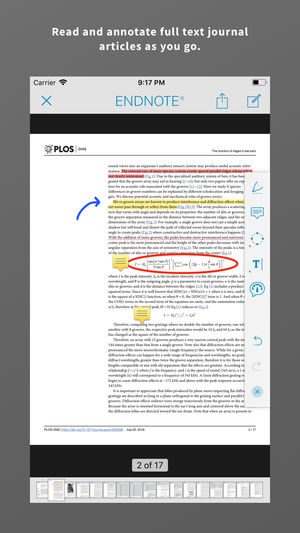
EndNote Web biedt een online interface die qua uiterlijk lijkt op de desktopversie. Met EndNote Web kunt u een referentie ook in hetzelfde venster bewerken met de panelen 'Summary', 'Edit' en 'File Attachment', net zoals op de desktop. Als er een PDF aan een referentie is toegevoegd, kunt u die PDF in een apart browservenster openen met een PDF-reader om deze te lezen. Als CrossRef bijgewerkte metagegevens voor een referentie beschikbaar heeft, verschijnt er een melding in het paneel 'Edit'.
Hi,
I want to express my sincere gratitude for your guidance. You have been incredibly helpful, and I truly appreciate all the assistance you’ve provided. It’s a pleasure working with such kind and supportive individuals.
Thank you once again for everything!
Beste,
Dank voor het prompte en zeer hulpvaardige antwoord.
MvG,
Bij voorbaat dank en tevens dank voor het gebruik van de knap in elkaar stekende software. Jullie technische hoogstandje heeft auteurs die het echt niet meer wisten uit de brand geholpen en mij gered van mijn eigen fouten. Kortom, ondoenlijke dingen doenlijk gemaakt.
Veel succes verder, want het blijft work in progress.
Vriendelijke groet,
Fantastisch geholpen, dank!
Hartelijk dank voor de uitgebreide hulp!!
Geweldig! Het is gelukt :). Hartelijke groet.
Fantastisch geholpen, dank!
This is a very informative email with great knowledge, thank you so much for this amazing support, I will share the following with the client and get back to you.
Altijd top, jullie ondersteuning en advies.
Dikke dankjewel! Hier kunnen we mee verder.
Met vriendelijke groeten.
Dag Suat, Nogmaals enorm bedankt voor al jouw inspanningen die uiteindelijk gelukkig ook beloond werden. Al is de beloning er vooral voor mij in de vorm van een hersteld databestand. Zelf heb ik er niets aan gedaan behalve bewonderend toegekeken. Als ik het fatsoeneringswerk achter de rug heb, kom ik telefonisch erop terug voor de online versie.
Zo fijn dat ik op zo’n kwaliteits-support kan terugvallen !!
Heel erg bedankt !
Hartelijke groet,
Heel erg bedankt voor je snelle reactie en fijne en duidelijke hulp!
Ik kan nu inderdaad alle bronnen openen en kan aan de slag.
Met vriendelijke groet,
Het is PERFECT gelukt. Dikke dankjewel. Duidelijk beschreven en met heel handige documenten in bijlage.
Super! Top service.
Met vriendelijke groeten en prettig weekend!
Je bent fantastisch, dank je zeer.
groet,
Following your instructions, it looks that my library is finally working properly!
Thanks again for your prompt and valuable support. If I have some further questions I will be asking for your assistance.
I am highly recommending to my colleagues, graduate students and academic staff to buy/subscribe/use EndNote 20
Your
Weer erg blij met je. ☺ Je levert hoge kwaliteit in hele korte tijd. Ik ben een fan !
Met vriendelijke groet,
Ja hoor, na paar keer proberen ging het downloaden goed. Het indexeren van de pdf’s was een lange operatie. Maar nu lopen de libraries als een tierelier.
Wel even wennen aan de wat andere vormgeving! Endnote is een geweldig programma! Hartelijk bedankt voor de uitstekende service!
It works really well now.
Thank you very much for your help and quick response. Greatly appreciated!
Have a good day.
Kind regards,
Dear Johan,
Many thanks for the support and help with the endnote purchase. I could download it with your colleague’s help and the software is working fine.
Best Regards,
Dear,
Thank you, the problem is solved. You are the best person.
Thank you so much.
Dank je wel voor de goede ondersteuning vanmiddag (inclusief deze handige mails). Dat was zeer nuttig.
Met vriendelijke groet,
Ik heb net de stappen doorlopen die u stuurde en dat was inderdaad waarom het niet werkte. Nu is het goed dus heel erg bedankt!
Dank voor de snelle en complete service!
Dünkü hızlı yanıtınız için milyonlarca kez teşekkürler! Ve tabiki mükemmel teknik desteği için Hakan Bey’e ayrıca teşekkür ederim. Bundan sonra bir yazılıma ihtiyacım olduğunda tabiki ilk tercihim Researchsoftware.com olacaktır.
Saygılarımla
Dag meneer,
Ontzettend bedankt voor uw hulp! Het is inmiddels gelukt.
Hai Suat,
Super bedankt voor al je moeite. Heel erg blij met het resultaat.
Groetjes,
Merhaba,
Öncelikle EndNote programı ile akademik hayatımızı kolaylaştırdığınız için çok teşekkür ediyorum.
Ama özellikle, her aradığımda aynı nezaketle, naiflikle karşılayan, hiç bir zaman geri çevirmeyen ve problemimi çözmek için samimiyetle ilgilenen Sayın Kadir Bey’e çok teşekkür ediyorum ve şükranlarımı sunuyorum. Yakın tarihte yine yazılım ve dosyayla ilgili bir problemimi çözdü ve beni çok mutlu etti.
Saygılarımla.
Veel dank voor het herstellen van mijn virtuele bibliotheek!
Vriendelijke groeten,
GELUKT!
Dikke merci
Thanks a lot Johan,
I am glad to have found your Company for my EndNote requests.
Dank voor de informatie en de behulpzame ondersteuning!
Met vriendelijke groet,
Beste Suat,
Heel hartelijk dank voor je hulp en uitleg. Ben blij dat je het probleem hebt kunnen oplossen en ik heb weer bijgeleerd.
Met vriendelijke groet,
Thanks a million for the quick response yesterday! And of course, a special thanks for Hakan Bey for his great technical support. When I need to buy a new software programme, www.researchsoftware.com will be my first choice.
Best regards
Beste, Heel erg bedankt voor uw hulp. Daar ben ik uiteraard erg blij om. Vriendelijke groeten,
Dag Suat in Amsterdam, Ik was net een antwoordje naar je aan het typen, toen jouw mail binnenkwam. Nogmaals hartelijk dank uit Brugge. Jouw tussenkomst was werkelijk een grote opkikker in mijn lange doctoraatsdagen en ik heb weer heel veel bijgeleerd! Ik doe nu het nodige om via de universiteit aan versie X9.3.1 te raken. Een mooie (en gezonde) dag gewenst.
Super! Ik ben er. Bedankt voor de onmisbare support.
ha Suat,
Heel veel dank voor je hulp, super.
hartelijke groet,
Super veel dank! Het werkt Fijne feestdagen alvast. Mvg
Een énorm grote dankjewel hiervoor, het werkt prima zo! Een hele geruststelling zo vlak voor het weekend! Fijn eindejaar, Met vriendelijke groeten
Bedankt voor je fantastische service, heel fijn dat jullie me met zoveel geduld op weg hebben geholpen. Hartelijke groet,
Hakan hocam, Şimdi yapabildim. Açıklayıcı anlatımınız ve çok hızlı geri dönüşünüz için ayrıca çok teşekkür ederim. Saygı ve selamlar
Het is gelukt! Bedankt voor de snelle reactie en ondersteuning.
This is very helpful. Thank you so much for your continuous feedback and support. I will update accordingly.
Kind regards
Bedankt voor de snelle service.
Dank voor je snel en dienstbaar antwoord.
Bedankt voor de snelle service. Het is gelukt met de download.
Bij deze wil ik u dan ook van harte bedanken voor de hulp en goede service!
Met vriendelijke groet,
Dit lijkt te werken! Veel dank voor uw hulp! Als ik toch nog een probleem zou tegen komen, zal ik u opnieuw contacteren.
Mvg,
Super behulpzaam en bedankt
Gr
Je bent een topper! Dank je wel voor de snelle actie. 🙂
Nogmaals dank u wel voor de super hulp.
Met vriendelijke groeten
Nogmaals heel hartelijk dank voor de hulp en het herstellen van de gecrashte library! Top service!!!
Erg blij met u.
Fijne avond gewenst!
Hoi Johan,
Bedankt voor het snel schakelen, ondanks de tropische temperaturen.
Met vriendelijke groeten, Kind regards
Many thanks for you assistance. It is greatly appreciated.
Best wishes
Nogmaals hartelijk dank, Suat!
Ook voor de uitstekende service!
Vriendelijke groet,
Bedankt voor de duidelijke en snelle antwoorden.
Met vriendelijke groet,
Yay, het werkt!!! Superveel dank.
Het lijkt inderdaad te werken :). Hij moet nog 5000 referenties binnenhalen, dus dat duurt nog wel even.
Alvast bedankt voor wederom een goede service!
Met vriendelijke groeten,
Met dit nummer werkt het! Ontzettend bedankt, ik kan EndNote9 nu gewoon gebruiken. U heeft me echt heel blij gemaakt!
Met vriendelijke groet,
Beste Suat,
Het probleem is dankzij jouw hulp (opnieuw!) opgelost. Waarvoor hartelijk dank.
Met vriendelijke groeten,
Nele
Dank je wel voor je snelle reactie en de prima ondersteuning.
Nogmaals heel hartelijk dank voor de hulp en het herstellen van de gecrashte library! Top service!!!
You are super. Thanks a lot.
With that hint I was able to fix the problem. I also did the backup. Thank you so much!
Best
Beste Suat,
Je bent al jaren één van de beste helpdesk-medewerkers die ik ken – en ik ken er een hoop! Ik vind je helemaal super! Geen verbeterpuntjes, top-helpdesk.
Many, many thanks, Johan. You fellows are the best. Wish more companies were as responsive and helpful as you.
Wish you well.
Thank you very much indeed for your prompt and helpful reply. Will try follow your advice and try to reorganize the PDFs of which I have 700+.
Your customer service is excellent.
Prima de luuks! Zowel de hulp voor de password change voor support portal, als de tips en screendump voor het aanpassen van het stijl-bestand waren succesvol. Dat werkt nu precies zoals ik het graag zie.
Het veranderen van de punt in een komma heeft inderdaad geholpen. Super bedankt!
Met vriendelijke groeten,
Ik ben zeer tevreden met uw professionel en vriendelijke hulp. Complimenten!
Groeten,
Veel dank. Het ‘cite in’ gebeuren werkt heel snel nu. Echt een fijne oplossing zoals je voor mij vandaag hebt gerealiseerd.
met hartelijke groet,
Thanks a lot for your support this morning, it was once again highly appreciated.
Thank you very much for the great help!
Many thanks – working perfectly now!
Merry Christmas
Hartelijk dank! Hiermee kan ik verder! Met vriendelijke groeten
Ha, jij bent geweldig!!! Als er nog een prijs is voor goede klantenservice….. weet ik wel iemand. Hartelijk bedankt weer!! Met vriendelijke groet,
Beste supportteam, Wat een uitstekende service op zondag! Complimenten. Bedankt voor de snelle reactie. Heb inmiddels de bestelling opnieuw uitgevoerd en alles is prima gelukt. Nogmaals hartelijk bedankt en een fijne zondag toegewenst.
Beste heer Scheffel, Dank voor de zeer snelle afhandeling van mijn probleem. De activering is met succes verlopen. Mijn beste dank van een uiterst tevreden klant.
I have just purchased the upgrade X8 and all went smoothly.
Many thanks for your effective support
Veel dank voor jullie perfecte service!
Hallo Johan,
Helemaal gelukt!
Met mijn grote dank!
Met hartelijke groet,
Thanks johan
Great Jobs and many thanks for your efficiency
Best regards
Hartelijk dank voor de snelle service. Voor u ook een zeer fijne dag
Dear Suat, It was very nice speaking to you earlier this week. I must also take this opportunity to THANK you for helping me to get back on track with my research project. Thank you!
Thank you for this information, and your prompt assistance, it greatly appreciated.
Kind regards,
Thank you very much for your quick reply and for the clear description below. This was indeed what the problem was, so now it is working (in both versions)! Thank you very much for your help.
With kind regards,
Beste, Het is allemaal gelukt. Ik heb een werkende versie op mijn computer staan. Heel hartelijk bedankt voor de hulp.
Many thanks for the fast and very helpful response – that was what I had suspected, but nice to get formal confirmation. Cheers,
Thank you very very much. The figures solved the problem. Thank you for you attention and your patience in answering.
Gewoon even om te melden dat ik ondertussen nog twee hoofdstukken heb toegevoegd en dat was a piece of cake. Zeer dank je wel. Ik heb je aan het voorwoord van mijn PhD.
Everything went perfectly, thank you!
I very very thankful for guid me. I did section 2 and the problem solved. Thank you for having patiently answered my questions.
Çok teşekkür ediyorum. Dediğinizi uyguladım, sorun ortadan kalktı.
İyi günler dilerim.
Hartelijk dank voor deze snelle en adequate service! Hulde!
Met vriendelijke groet,
İlgi ve desteğiniz için tekrar teşekkür ediyorum,
İyi çalışmalar.
Dank jullie wel voor jullie uitstekende hulp met Endnote en grote geduld met mij!
Het geeft een heel vertrouwd gevoel!
Heel erg bedankt Johan, heel gewaardeerd!!!
Thank you Johan for the very clear explanation!!
Hakan bey
Destekleriniz için çok teşekkürler.
İyi çalışmalar dilerim.
Dank u! De informatie op uw website was zo eenvoudig te begrijpen en relevanter en zinvol dan alles wat ik had gevonden via Microsoft of EndNote. Zeer gewaardeerd!
Thank you once again for your strong support, this is really a wonderful service and quite beneficial to properly implement company-wide software thoroughly!!
Ok, it works now. It’s a pleasure to work with you.
merci beaucoup
EndNote’ u gönderdiğiniz link sayesinde eklemeyi başardım. Çok teşekkür ederim yardımlarınız için.
İyi çalışmalar.
Thank you – now working well !
Thank you very much dear Johan and Tolga. This is very clear. I’m very impressed by your professionalism. Best wishes for 2017.
Sincerely
Bedankt voor de werkelijk zeer vlotte service. Gr.
Tarafıma karşı göstermiş olduğunuz ilgiden dolayı teşekkür ederim.
Hakan Bey ,
Sorunumun çözümü ve hizmet anlayışınız için teşekkür ederim.
Kolay gelsin…
Dank voor je snelle reactie op maat (ik word een steeds grotere fan van jullie! 😉
Je tips lossen daarenboven nog enkele andere zaken op waarmee ik nog worstelde. Veel dank dus.
It works at present. I thank you very much for your help.
Best regards,
Merhaba Hakan Bey;
Stili tamamladım. Çok teşekkür ederim.
İyi çalışmalar dilerim…
Desteğiniz ve ilginiz için gerçekten çok teşekkür ederim. EndNote’u çevreme önermeye başlamıştım ama destek konusunda ilk kez size ulaşmaya çalıştım ve gerçekten ilginizi, hızınızı takdir ettim..
Çok teşekkür ederim tekrar, iyi çalışmalar..
Çok teşekkür ederim, elinize sağlık.
İyi çalışmalar,
Geachte anonieme researchsofware-medewerker, Ik ben dubbel verbijsterd, zowel door de snelheid van de reactie (en dat op een zondag) en door de accuraatheid van het advies. Het advies was goed op te volgen, en ik heb de indruk dat het programma nu helemaal naar behoren werkt. Hartelijk dank, en prettige zondag. Vriendelijke groeten,
Bedankt voor deze snelle oplossing en levering!
Beste Johan of collega,
Dank je voor deze geweldige service. Ik zal vanavond gaan kijken, maar eerst bepalen wat handiger is: of eerst nieuwste versie van het besturingssysteem downloaden of X8.
Hoewel reeds mondeling gecommuniceerd, toch bij deze : “welgemeend en van ganser harte dank”. Ik houd je aan uw belofte.
Dank je voor de info. Werkt super!
Met vriendelijke groeten,
Zeer geachte heer, Ik ben aangenaam verrast en bijzonder dankbaar voor uw geduld en voor uw prompte telefonische adviesverstrekking omtrent het activeren van de software. Uzelf vindt dat allicht heel gewoon – het is tenslotte uw werk … Maar ik vind dat helemaal níét gewoon. Met hoogachting, vriendelijke groet en nogmaals dank.
Rond 21.00 antwoord je me nog. Jij bent te goed.voor deze wereld.
Maar nu naar jouw oplossing: DIE WERKT!!!
Merhaba Hakan bey,
Desteğinizle problemim çözüldü.
Teşekkür ederim.
Beste,
Heel erg bedankt hiervoor!
Met vriendelijke groeten,
Many thanks for your prompt reply and help. Very much appreciated. Yes, we had backups. And IT was able to fix and it’s working just now again. Happy (:-
Kind regards,
Teşekkür ederim malumat için; yeni sürümü yükleyip programı güncelledim ve sorunsuz olarak çalışmaktadır.
Yardımlarınız içinde ayriyeten teşekkürler…
Kalın Sağlıcakla,
super. hartelijk dank voor snelle respons
Dank allebei, het werkt, ook bij mij. Ik ben er blij mee. Groet,
Hartelijk dank. Werkt nu als een zonnetje.
Met vriendelijke groet,
Dear Sir,
Many thanks again for your help! Best regards,
Graag wil ik u bedanken voor de snelle en deskundige hulp die ik van u heb gekregen bij het oplossen van mijn activeringsproblemen. Wat bij de helpdesk van …. een slepende kwestie was, was bij u in een uur en op een klantvriendelijke wijze opgelost.
Hulde, dank en groet,
That all seems to have gone smoothly. I have now downloaded the software, which appears to be working fine. Many thanks for the prompt help. Excellent service!
Sorry to have been a nuisance.
Bedankt voor het snelle antwoord (zelfs op zondag!). Was heel duidelijk. Meteen gekocht, gedownload en ol werkt alweer met versie X7. Hulde voor de gemakkelijke gang van zaken bij het overzetten.
Met vriendelijke groet,
Yoğun tez yazım dönemimde belkide 10 günümü alabilecek bir sorunum kısa sürede halloldu.
Sabrınız için teşekkür ederim Hakan bey.
Beste Heer,
Alles is inmiddels, zoals steeds, uiterst bevredigend opgelost via Suat.
Dank voor uw interesse.
Vriendelijke groeten.
Problemim çözüldü, ilginiz için teşekkür ederim.
EndNote yetkililerinin desteğiyle problemim çözüldü.
İlginize çok teşekkür ederim.
İyi çalışmalar…
Bilgileriniz için çok teşekkür ederim.
Çok güzel açıklamışsınız.
Çok teşekkür ederim.
Gerçekten çok profesyonel ve ilgilisiniz.
İyi çalışmalar..
Çok teşekkür ederim, 🙂
Hijdoetut!
Hierbij mijn oprechte dank voor uw duidelijke uitleg, het installeren en gebruiken verloopt nu vlekkeloos. Tevens wens ik nog even te vermelden dat de service van u en uw bedrijf werkelijk een felicitatie waard is.
Dit noem ik nu eens echte reclame. Ik zal mijn tevredenheid over de dienst na verkoop van uw bedrijf vertellen aan mijn vriendenkring!
Verder moet mij nog van het hart dat de service en info die jullie geven tot nu toe perfect is. Ik maak als ‘kleine en commercieel wellicht niet-zo-interessante-gebruiker’ het niet zo vaak mee dat er aan de telefoon een directe klant-herkenning plaatsvindt bij software-huizen. Binnen ons mbo-instituut en via de Mac-platforms zal ik DISC aanprijzen! In mijn digitale handtekeningen zal ik melding maken van het het Write-pakket met daarbij een link naar DISC.
Het ga jullie goed en ongetwijfeld hebben we nog wel een keer telefonisch contact.
De kogel is door de kerk!
De opendeurvraag heeft het hem gedaan..Much ado about nothing…dank voor de geweldige support!
Dank je wel voor het snelle antwoord.
Het probleem is opgelost. Nog nooit kreeg ik zo snel respons op een vraag. Bijzondere dank en een pluim daarvoor.
Geachte,
Mijn hartelijke dank voor de snelle en doeltreffende hulp!!
Goede service!
Hartelijk dank voor uw goede service!
Beste Harrie, beste Suat,
Geweldig! Met dank!
Vriendelijke groet,
Hardstikke bedankt voor de sympathieke service! Alles werkt weer helemaal goed; heerlijk!
Hartelijke groet,
Geachte Mariël,
Dit werkt perfect! 1000x dank!! Bedankt voor de service!
Ik houd er aan u zeer in het bijzonder mijn dank uit te spreken voor de zeer dienstbare hulp die u mij verschaft hebt bij het in gebruik nemen van het bestelde. Niet alleen was je bijzonder goed geschoold in dit domein en bracht u deze zeer efficiënt over, maar wat mij meest van al is opgevallen is je vriendelijkheid en innemendheid die echt van hoog gehalte was. Voor mij verdient u hiervoor een Oscar, … en mag u worden ingeschreven in het Guiness Book of records. Dit mag u overdreven lijken, maar voor mij is dit welgemeend. Het was uitzonderlijk wat ik meemaakte. Het is prettig zo iets te kunnen vaststellen op een boogscheut van mij 75e verjaardag! Ik wens u nog veel succes toe in je beroepsleven, en niet minder in al de rest …
Vriendelijke groeten van uw zuiderbuur.
LS,
Het werkt!
Bedankt voor uw geweldige support. Daar kunnen een hoop van leren.
Met vriendelijke groet,
Dank je wel voor het snelle antwoord.
MAar het probleem is opgelost. Via een andere PC, en de aangegeven web-site kon ik de nodige codes achterhalen.
PS: nog nooit kreeg ik zo snel respons op een vraag. Bijzondere dank en een pluim daarvoor
Met vriendelijke groeten,
Je bent heel vriendelijk bedankt.
Na de miserie van al een deel van mijn gegevens kwijt te zijn doet het deugd dat er nog vriendelijke en begrijpende mensen zijn. Zoals je weet is mond aan mond reclame de beste reclame en die zal ik zeker maken voor jullie.
Nogmaals bedankt
Hoe dan ook, nogmaals mijn oprechte dank en vriendelijke groete
Heel erg bedankt…ik waardeer dit zeer
Het is tekenend voor een perfecte service
Nogmaals bedankt
Met vriendelijke groeten uit Wenen
Beste Johan,
Hartelijk dank voor de emails. Ik heb het op mijn Mac gedownload en alles lijkt te werken. Ik ben er echt heel blij mee, omdat ik al vreesde dat ik een nieuwe versie speciaal voor de Mac moest aanschaffen.
Met vriendelijke groet en dank,
Gelukt!
Bedankt, Alptug. 🙂
Beste Suat,
Nogmaals mijn dank voor je deskundigheid, je vriendelijkheid en je geduld vanmorgen!
Vriendelijke groeten,
Beste Suat,
Een enorme bedankt: je hebt mijn dag gemaakt!
Ik wens je een fijne dag,
Met vriendelijke groeten,
Mevrouw, mijnheer,
Het is naar uw woord verlopen.
Maar het werkt, het werkt, het werkt, het werkt, het werkt, het werkt, het werkt, het werkt, het werkt, het werkt, het werkt.
Ik ben erg content want ik gebruik het woordenboek bijna dagelijks.
Van harte bedankt voor uw geduld en hulp (zelfs op zondag).
Geachte mevrouw, mijnheer, een oprecht goedemorgen,
Ter informatie: na aanschaf en telefonische instructie is de installatie gesmeerd verlopen. Wij zijn er heel gelukkig mee. Mede namens Marry onze hartelijke dank.
Vriendelijke groet en tot een volgende ronde,
Beste Suat, hartelijk dank voor dit snelle en duidelijke antwoord, kunnen veel bedrijven nog wat van leren.
Met vriendelijke groet,
Zeer geachte Dames en Heren,
Het vervangende versie in dank ontvangen, Ook het installeren etc. is volgens mij prima gelukt.
Verder wil ik u nog bedanken voor de geweldige service !
Met vriendelijke Groeten,
Suat, dank voor de hulp die je gegeven hebt. Het werkt allemaal. Super. Mijn dank en mijn complimenten voor je hulp.
Met vriendelijke groet, best regards,
Dan gaan we daar maar vanuit, zeer mogelijk heb jij meer verstand van jullie eigen programmatuur dan ik.
Mijn complimenten voor de snelle responsen, medewerking en klantvriendelijkheid overigens.
met vriendelijke groet,
Beste Suat,
Je stappen heb ik nogmaals doorgenomen en uiteindelijk is het gelukt. Mijn dank is groot.
Nogmaals mijn complimenten voor de super klantvriendelijkheid. Het mooie hiervan is dat ik dus reference manager van harte zal aanbevelen bij collegae.
Een hele fijne vakantie toegewenst en hartelijke groet,
Beste Johan,
Hartelijk dank! Ik ben overigens erg tevreden over het product en de wijze van levering.
Met vriendelijke groet,
Graag gedaan, mag ook wel eens gezegd worden, is namelijk niet altijd zo vanzelfsprekend dat de service goed is!
Beste Johan,
Ik sprak net met het westfriesgasthuis die aangaven dat jullie ze hadden geholpen met een technische uitdaging en ze waren erg blij hoe ze geholpen waren, onze dank daarvoor!
Mvg,
Toch even een bedankje voor de zeer snelle, en goede service. Het staat op mijn computer en werkt.
Pluim!!!! Dat is wel eens anders (meestal)…
Beste mensen,
Bedankt! Het werkt weer als vanouds en…ik heb het hier in Brazilie echt nodig af en toe!
Als jullie me kunnen garanderen dat ik in elk geval van crash, blikseminslag (het gaat er hier heviger aan toe dan gewoonlijk in Nederland) of piek in het electriciteits-net bij jullie kan aankloppen voor een heractivering, dan ben ik helemaal gerust!
Nogmaals met mijn dank, en jullie een prettig weekend toewensend,
met vriendelijke groet,
Beste mensen,
Bedankt! Het werkt weer als vanouds en…ik heb het hier in Brazilie echt nodig af en toe!
Als jullie me kunnen garanderen dat ik in elk geval van crash, blikseminslag (het gaat er hier heviger aan toe dan gewoonlijk in Nederland) of piek in het electriciteits-net bij jullie kan aankloppen voor een heractivering, dan ben ik helemaal gerust!
Nogmaals met mijn dank, en jullie een prettig weekend toewensend,
met vriendelijke groet,
Dat zal ik doen. Nogmaals hartelijk dank voor de prima service.
m.vr.gr.
L.S.
Bedankt voor de klantvriendelijke en snelle service.
Het werkt weer prima :-).
Nogmaals bedankt voor de goede service en mocht ik in de toekomst weer moeilijkheden krijgen, dan weet ik u weer te vinden.
Ook zal ik mijn familie, vrienden en kennissen jullie site van harte aanbevelen.
Vriendelijk groeten,
Hartelijk dank voor deze supersnelle en “persoonlijke” voorkeursbehandeling.
Met vriendelijke groet,
Bedankt voor de goede service en met vriendelijke groet,
FANTASTISCH Suat!
Ik kan het helaas nu niet uitvoeren, maar zodra in terug ben en goede internet doe ik het en laat ik het je weten!
REUZE bedankt voor je geduld & hulp!
Groeten uit Sudan,
Suat,
heel heel erg bedankt voor alle ondersteuning. Dat is nog eens service van een bedrijf en een persoon die zijn werk doet. Alles werkt nu. Enorm goed!!!
Met vriendelijke groet, best regards,
Beste Suat,
Ontzettend bedankt voor de tijd en moeite. Ze doen het nu allemaal! Ik ga vrolijk verder met mijn werk. Bedankt!
Groet,
Hallo Tolga,
HEEL HARTELIJK BEDANKT VOOR JE HULP! NA MEER DAN EEN MAAND HEEN EN WEER PING-PONGEN VAN E-MAILS IS HET DAN EINDELIJK OPGELOST!
DANK JE WEL!
Jouw service verdient een 10!
Met vriendelijke groet,
Het was uzelf heer Scheffel. Ik heb het er met u over gehad en toen besloten om X6 aan te schaffen met de “vooruitgedachte” niet langer te wachten tot de nieuwste X7 uit zou komen. U vertelde me over die update en dat ie mei/juni zou uitkomen. Vandaar uit zeiden we dat het dan logisch was om nu alvast X6 te kopen.
Ik ben geen ” koopjesjager “maar vind logische iets kopen met een aankomende update (of anders even te wachten) wel nuttig om mee te nemen als zelfstandige ondernemer.
IK DANK U EN UW BEDRIJF OVERIGENS TEN ZEERSTE NIET ALLEEN HIERVOOR maar ben erg tevreden over klantgerichtheid en topservice.
Met vriendelijke groet,
Dag Johan,
Bedankt voor de ‘eclatante’ hulp bij de activering!
Groet,
Beste Suat,
Dat is mooi helder samengevat, kan ik mooi meesturen aan de auteur*. *(Die ‘Lynn’, bedoel ik dus.)
Dankjewel weer voor de goede hulp!
en vriendelijke groeten,
Beste,
Hartelijk dank voor de snelle en goede service. Dit heeft inderdaad niet lang geduurd en voila… het is geïnstalleerd en werkt.
Mvg,
Thanks a lot for your amazingly quick reply Johan. Have a nice day. 🙂
Many thanks,
Thanks a lot for your amazingly quick reply Johan. Have a nice day. 🙂
Many thanks,
Beste Suat,
Je bent een KEI! De truuk is volledig gelukt. Bijzondere dank dus. (en als ik weer in de problemen kom, weet ik je te vinden…)
Hartelijke groet, Kind regards,
Dank voor jullie (zoals gewoonlijk) supersnelle service 😉
groet,
Verrassend jullie service! Echt super… Dankje
Beste,
Ik wil jullie uitdrukkelijk bedanken voor de hulp en bijstand.
Mvgrt,
Dag Suat,
Wat ben jij toch een VRESELIJK GOEDE helpdesk. Jouw verhaal is helemaal duidelijk en…. het werkt!
Veel dank dus voor de moeite om mij te informeren.
Hartelijke groeten, Best regards,
Hahaha,
ik heb het ondertussen ook al werkzaam. Heb alle licenties als verzameling ingevoerd in protection manager, restart en draait als een zonnetje. Wel super dat jullie deze service verlenen, wordt gewaardeerd!
Bedankt en goed weekend,
Super bedankt! Ook voor de uitleg en de hulp aan de telefoon!
met vriendelijke groet,
Dank voor snelle en duidelijke reactie. Ben er blij mee, want kan niet goed zonder DvD.
Dank je wel dus,
Geacht serviceteam, Dit is pas service met hoofdletters…! 😉 De tekst is volgens mij duidelijk genoeg, hoor. Het enige wat mij niet duidelijk was, was dat ik eerst zou moeten ‘bewijzen’ dat ik student ben. Impliciet zou je dat wel kunnen verwachten, natuurlijk. Er zijn alleen veel sites waarbij ze dat wel zeggen, maar niet controleren. Vandaar… Maar nogmaals, jullie hebben de service wel erg scherp! 😉 Met vriendelijke groeten,
Ja, inderdaad! Fijn dat het weer werkt. Goede service, heel fijn.
Nogmaals hartelijk dank voor uw raad en assistentie. Ik ben hier erg blij mee!
Met vriendelijke groet,
Ik wil je nogmaals echt heel erg bedanken voor je fantastische service en flexibiliteit. De installatie verliep vlekkeloss en alles draait nu netjes in één scherm.
Mooi hoor! Met hartelijke groet,
Super dat je altijd zo kundig bent en makkelijk benaderbaar!
Already done! Thank’s a lot for your rapid(issimo), professional and helpful intervention !
Have a good Sunday,
Bedankt Suat. Het lijkt nu te werken! Hartelijk dank voor de geboden hulp.
Zonder je hulp was het niet gelukt.
Met vriendelijke groet,
Geachte heer, mevrouw,
hartelijk dank voor uw snelle en prettige service.
Hartelijk dank voor de uitgebreide hulp!!
Hartelijk dank voor de uitgebreide hulp!!
Geachte Johan,
Veel dank ook voor het telefoontje hedenmorgen. Erg attent. Het is gelukt ENDNOTE als vanouds te laten werken.
Met groet,
Thank you, It worked.
Beste Johan,
Gezien het feit dat u al jaren niet meer levert, is een welgemeend dank-je-wel voor uw service hier zeer op zijn plaats.
Hartelijke groet,
Dank u zeer voor snelle service. Met vriendelijke groet,
Fantastisch hoor, zo’n snelle (zelfs zondagochtend) respons. Uitstekende opvolging! Vriendelijke groet en nog een prettige zondag (zonder veel vragen van klanten, met uitzondering van bestellingen natuurlijk;-)
Mijn dank voor uw aangedragen oplossing. Kortom ik ben geweldig geholpen en alles werkt weer zoals het hoort. Met vriendelijke groeten,
Hi Suat By this email I would like thank you for your precious support. It helped me lots. I installed the software successfully and it runs perfectly. Kind regards
Geachte helpdesk, Wat een geweldige service! Inderdaad heb ik de back-up disk, maar een laptop gekocht zonder interne cd-speler. Heel slim. Hartelijk dank,
Goedemorgen, Hartelijk bedankt voor de snelle reactie. Downloaden en installeren via de gestuurde weblink was een fluitje van een cent. Activeren ging ook probleemloos. Kan nu weer aan de slag. Nogmaals bedankt! Met vriendelijke groet,
Geachte Suat, Hartelijke dank voor uw service, zie file Ik ben heel héél tevreden, Mvg,
Hij doet het! Dank voor de snelle reactie in het weekend. Goede service.
Heel erg bedankt!
U vindt de ondertekende offerte in bijlage. En ik wil u ook nog bedanken voor de goede samenwerking en het behulpzaam beantwoorden van al mijn vragen (met extra dank aan Suat die mij telefonisch door het hele Sync-gedoe hielp!). Met vriendelijke groeten,
Thank you Suat! Perfect!
Çok teşekkür ederim. Gerçekten çok profesyonel ve ilgilisiniz. İyi çalışmalar..
Beste Suat, Wat een geweldig goede reactie. Helemaal super. Dankjewel !!! Met vriendelijke groet,
Heel veel dank Suat voor onderstaande en voor al je werk! Super! We zijn heel blij dat het allemaal weer werkt. hartelijke groet, mede namens Patti
Dank voor de ondersteuning!
Super bedankt weer voor de tip!
Heb de database opnieuw op deze manier aangemaakt en kan nu dus de PDF’jes weer gaan toevoegen.
Nogmaals dank weer & vriendelijke groet,
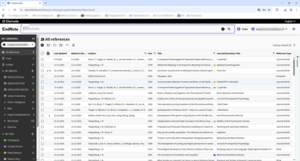
Het 'Summary' paneel voor een referentie biedt ook een voorbeeldweergave waarmee u kunt zien hoe de referentie eruit zou zien in een beperkt aantal opmaakstijlen, en u kunt de referentie in die opmaak kopiëren om in een document te plakken.
EndNote Web bevat de functie Research Assistant, die ook beschikbaar is in EndNote Desktop. De Research Assistant maakt gebruik van een generatieve, door AI aangestuurde tool die uw onderzoek verrijkt door belangrijke inzichten uit afzonderlijke artikelen te halen en een samenvatting van het artikel te genereren die onafhankelijk is van de samenvatting van de auteur.
EndNote Web bevat ook een PDF-viewer voor PDF-bijlagen.
Cite While You Write
De functie 'Cite While You Write' in Word Online en Google Docs is geïntegreerd met EndNote Web. Als je op de links in die programma’s klikt, word je doorgestuurd naar de EndNote Web-interface voor je bibliotheek.
Tags
EndNote Web ondersteunt de tagfunctie in EndNote. Tags kunnen zowel via de desktop als via de EndNote Web-interface aan bronvermeldingen worden toegewezen en beheerd.
Andere functies vergelijkbaar met die van EndNote 2025 Desktop
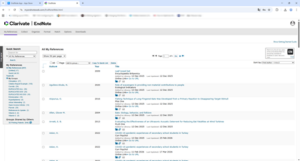
Net als in de desktopversie kunt u in EndNote Web zelf bepalen welke kolommen in de browser worden weergegeven. Klik hiervoor op de knop Columns helemaal rechts. Klik vervolgens op een kolomkop om de bibliotheek op dat veld te sorteren.
Met EndNote Web kun je de weergave van de interface aanpassen via de  pictogram met opties om het besturingssysteem aan te passen, of om een lichte of donkere weergave te kiezen.
Vertaald met DeepL.com (gratis versie)
pictogram met opties om het besturingssysteem aan te passen, of om een lichte of donkere weergave te kiezen.
Vertaald met DeepL.com (gratis versie)
En natuurlijk kun je je referenties op verschillende manieren beheren met behulp van de handige EndNote Web-werkbalk.
Voordelen van het aanmaken van een EndNote Web-account
Door een EndNote Web-account te activeren en te registreren, profiteert u van de volgende voordelen:
- Je hebt overal en met elke moderne browser via internet toegang tot je Sync-bibliotheek.
- Download EndNote voor iPhone of EndNote voor iPad uit de Apple App Store en synchroniseer uw bibliotheek met uw EndNote voor iPhone of EndNote voor iPad.
- Installeer EndNote Desktop op een andere computer (macOS, Windows, thuiscomputer, laptop) en voer het e-mailadres en wachtwoord van je EndNote Web-account in onder ‘Preferences’ (Settings) > ‘Sync’. Synchroniseer vervolgens je online bibliotheek met de nieuwe computer. Wijzigingen en updates in je bibliotheek worden automatisch gesynchroniseerd met EndNote Web en van daaruit met de andere EndNote-omgevingen, en vice versa.
- Deel je bibliotheek met 1.000 anderen (e-mailadressen) via een EndNote Web-account.
- Deel een groep in uw bibliotheek met 1.000 anderen (e-mailadressen) die een EndNote Web-account hebben.